
888PKR Game APK Download (New Earning App) Free In 2026
16MB
V0.1.0
Android 5+
1.5K
Description
Trying a newly launched Android application can be interesting, but there are a few things worth checking before installing it on your phone. 888PKR Game is a new name appearing in APK-related searches, and many users want to understand what the application offers and how to get started.
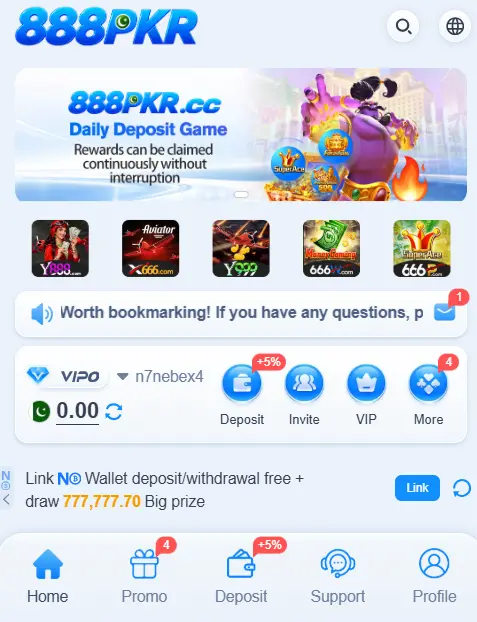
If you have come across this app recently, you might be wondering about its installation, Android requirements, available options, and overall experience. These are sensible questions, particularly when information about a new application is still limited.
In this guide, we’ll look at the available information about 888PKR, explain how Android APK installation works, and cover the common issues users may encounter. We’ll also discuss privacy, permissions, and account safety so you can make a more informed decision.
Getting to Know 888PKR Game
888PKR is the name of a newly launched Android game or game-related application promoted through online APK listings. People searching for it may come across download pages, application descriptions, and guides explaining how to install it.
However, an application’s name alone doesn’t tell us everything about its developer, functionality, or authenticity. Different websites can also publish files with similar names, making it important to check the actual application rather than trusting every listing.
Before downloading, look for basic details such as:
- Developer or publisher name
- Application version
- APK file size
- Android compatibility
- Package information
- Last update date
- Requested permissions
These details help you understand which application you are considering. If a website doesn’t provide them, avoid assuming that its download is official.
Why Is This New App Getting Attention?
Whenever a new application appears online, people naturally start looking for information about it. Some want to see what it does, while others are mainly interested in finding out whether their smartphones can run it.
Searches related to 888PKR commonly revolve around APK downloads, installation instructions, login information, compatibility, and application updates.
The difficulty is that a new release may not have much reliable documentation available yet. This is why checking the actual version and publisher is more useful than relying on copied descriptions from multiple websites.
888PKR APK – What Should You Know?
An APK is the installation package used by Android applications. It contains the software components needed to install an app on a compatible Android device.
Unlike an ordinary Google Play installation, downloading an APK manually means you have to pay closer attention to its source.
A file ending in .apk is not automatically safe or official. Two files can have similar names but come from different developers or websites.
For 888PKR, check the available release information before selecting a file. The exact version, file size and minimum Android requirement should be confirmed from a trustworthy source rather than guessed.
Things to Check Before Downloading
- A few minutes of checking can save you from unnecessary installation problems.
- Application source: Find out who publishes the application and whether the website identifies the developer clearly.
- Version details: Compare the listed version with available publisher information.
- File size: Check whether the downloaded file matches the information provided on the download page.
- Android support: Make sure your phone meets the application’s stated requirements.
- Permissions: Review what access the application requests.
- Privacy policy: Understand how your information may be collected and used.
- Be particularly careful with websites showing multiple download buttons. Some may lead to advertisements or unrelated files instead of the application you intended to download.
Exploring the Application Interface
The interface is usually the first thing users notice when opening a new mobile application. Clear menus, understandable labels, and accessible settings make an app easier to explore.
Since detailed official information about the current 888PKR release has not been independently confirmed, it would be misleading to promise a particular collection of features.
Instead, users should check the actual application for its available sections, settings, navigation options and account facilities.
If registration or login is offered, examine the requirements before providing personal information. Also look for help options and privacy settings.
How to Install 888PKR on Android
If you have obtained a legitimate APK from a source you trust, the general installation process is straightforward.
Download the File
Download the intended APK and allow the process to finish.
Open Your Downloads Folder
Use your phone’s file manager to locate the downloaded package.
Check the Application
Before opening it, confirm that the file matches the application you intended to download.
Review Android’s Warning
Android may display a warning when you install an application outside a recognized app store. Read the message carefully.
Complete Installation
If you have verified the source and decide to proceed, follow the instructions shown on your screen.
Review Permissions
Once installed, examine the permissions and available privacy settings before using the application.
You can also turn off the browser’s permission to install unknown applications when you have finished.
Does Your Phone Support 888PKR?
Not every Android application works on every smartphone. Compatibility depends on several factors, including the operating system, device hardware, and available storage.
Before installation, consider checking:
- Android operating system version
- Available storage space
- Device architecture
- RAM and hardware limitations
- Internet connection
- Minimum application requirements
An APK might download successfully but still fail during installation if your phone doesn’t meet its requirements.
Older devices may also experience slow performance or unexpected closing. Check the application’s actual compatibility information before trying different versions.
Security, Permissions and Privacy
This is an area that deserves more attention than many people give it.
When an application requests access to your camera, microphone, contacts, location or files, consider whether that access is genuinely necessary.
Not every permission is harmful, but you should understand why an application needs it.
Also consider these precautions:
- Keep Android security protections enabled.
- Avoid modified APK files from unknown websites.
- Never share passwords or verification codes.
- Read the available privacy policy.
- Avoid providing unnecessary personal information.
- Remove applications that behave suspiciously.
If you cannot identify the publisher or understand how your information is handled, it is better to avoid sharing sensitive details.
Common Problems and Their Solutions
Sometimes an APK installs without any difficulty, while other times users encounter unexpected errors. Here are a few common situations.
| Problem | What to Check |
|---|---|
| APK won’t install | Storage, compatibility and file integrity |
| App closes immediately | Android version and application compatibility |
| Slow performance | RAM, storage, and internet |
| Login issue | Credentials and connection |
| Download failure | Internet and download source |
| Update problem | Existing version and package conflicts |
Application Not Installing
An installation error can happen because the APK is damaged, the device lacks storage or an incompatible version is already installed.
Check these possibilities before downloading another file.
Application Keeps Closing
Restart your phone and check whether the device meets the application’s requirements. If the problem continues, investigate the source and version of the installation package.
How to Clear Application Cache
If the application is behaving unusually, clearing its temporary cache may help.
Open Android Settings, select Apps, find the relevant application, and open its storage settings. Choose Clear Cache if that option is available.
Remember that Clear Data is different. It can remove locally stored information and account settings, so don’t select it without understanding the consequences.
Payment and Deposit Methods
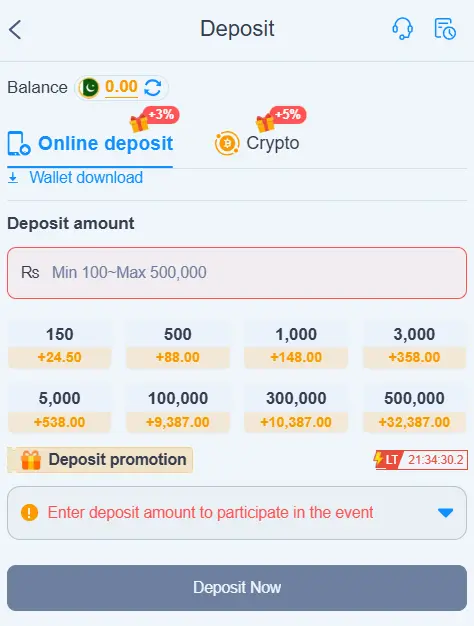
The 888PKR platform may display different payment and deposit options depending on account availability and region. In Pakistan, users commonly look for options such as JazzCash, Easypaisa, and bank transfers. However, these methods have not been independently verified for 888PKR. Before making a deposit, check the payment options shown inside the official platform, confirm the recipient details, and review any applicable fees and withdrawal conditions. Never send money to an unverified personal account.
How to Update or Remove the Application
Updates can introduce changes to an application’s interface, compatibility, and performance. However, users should never install an update simply because an unfamiliar website advertises a newer version.
Check the publisher, version information, and file source first.
If you no longer need the application, you can remove it through Android Settings:
- Open Settings.
- Select Apps.
- Find the application.
- Choose Uninstall.
- Confirm removal.
You may also want to delete the downloaded APK from your Downloads folder.
My Personal Opinion
I believe the best approach with a newly launched application is to understand it before deciding whether to use it. In the case of 888PKR, limited verified technical information means users should be especially careful about download sources and promotional descriptions.
I wouldn’t recommend sharing sensitive details or making financial commitments without first confirming who operates the platform and understanding its terms. Also, if an application involves wagering, remember that financial losses are possible and no earnings are guaranteed.
FAQs
What is 888PKR Game?
888PKR is a newly launched Android game or game-related application promoted through online APK listings. Its exact features should be checked against the current release.
How can I download 888PKR APK?
Look for a trustworthy source that identifies the publisher and provides clear version and compatibility information. Avoid unknown or modified files.
Does 888PKR work on all Android phones?
Not necessarily. Compatibility depends on the Android version, device hardware, available storage, and application requirements.
Why is 888PKR not installing on my phone?
Common reasons include insufficient storage, an incompatible Android version, a damaged APK, or a conflict with an existing installation.
Is 888PKR safe to install?
Its safety cannot be guaranteed without verifying the developer, APK source, permissions, and privacy practices. Always check these details before installation.
Final Thoughts
888PKR is a new application name that has started appearing in Android APK searches. Although users may be curious about trying it, getting accurate information should come before downloading anything.
Check the application source, confirm compatibility, and pay attention to permissions. If something looks suspicious or important details are missing, don’t rush the installation.
At APKHockey.com.pk, we believe a useful download guide should help readers understand an application rather than simply encourage them to install it. Taking a little time to verify the details is always a smarter way to explore a new Android app.
Download links
How to install 888PKR Game APK Download (New Earning App) Free In 2026 APK?
1. Tap the downloaded 888PKR Game APK Download (New Earning App) Free In 2026 APK file.
2. Touch install.
3. Follow the steps on the screen.